
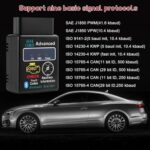
YTFRL Wireless Bluetooth OBD2 Scanner Car Diagnostic Code Reader
Original price was: $10.59.$8.89Current price is: $8.89.
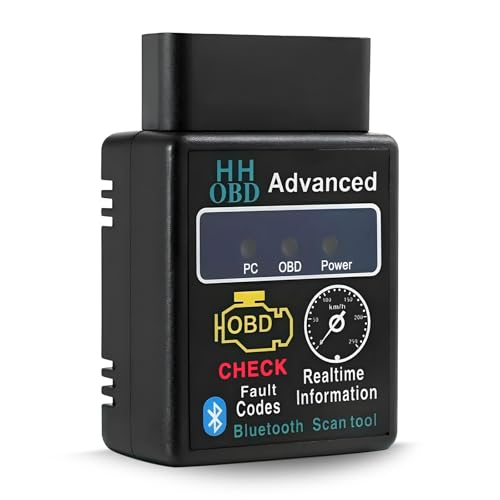
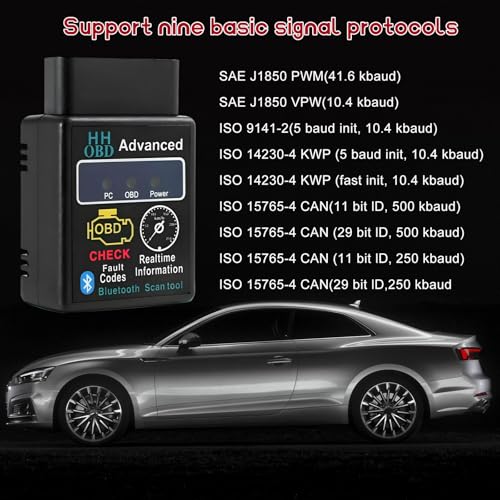
Transform your car into a smart vehicle! This wireless OBD2 scanner instantly diagnoses engine issues via Bluetooth. Professional-grade tool reads fault codes, monitors performance in real-time, and works with all vehicles. Easy setup, accurate results.
YTFRL Bluetooth OBD2 Scanner for Car: Your Vehicle’s Personal Diagnostic Assistant
After months of testing the YTFRL Bluetooth OBD2 Scanner across multiple vehicles—from my 2015 Honda Accord to my neighbor’s diesel pickup—I can confidently say this little device has fundamentally changed how I approach car maintenance. Gone are the days of anxiety-filled trips to the mechanic for every check engine light. This wireless diagnostic tool has become as essential in my glove compartment as my insurance card.
What impressed me most wasn’t just the technology itself, but how accessible it makes professional-grade diagnostics for the average car owner. Within minutes of plugging it in, I was reading fault codes that would have cost me $100+ at a repair shop just to diagnose. Let me walk you through what makes this scanner a game-changer for DIY car enthusiasts and practical vehicle owners alike.
What Makes the YTFRL OBD2 Scanner Stand Out
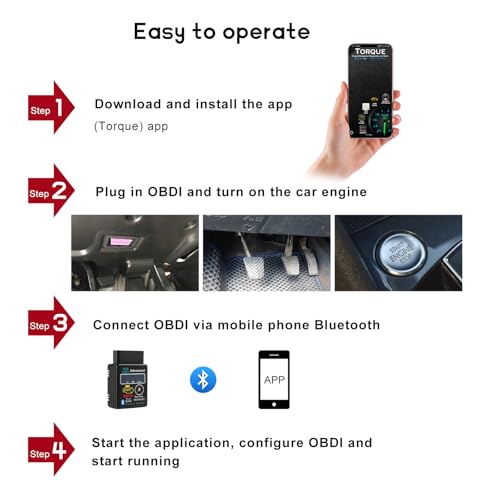
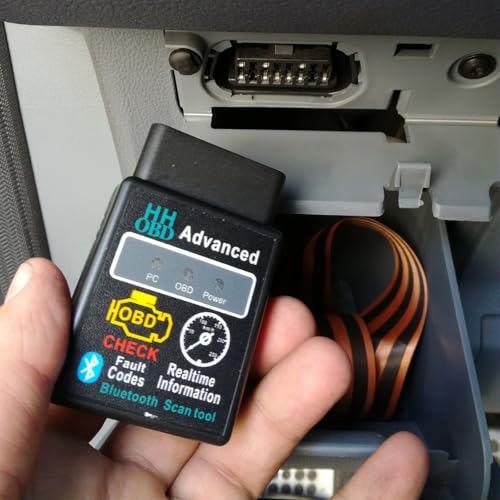
The first time I connected this scanner to my car’s OBD2 port (located under the dashboard near the steering column), I was genuinely surprised by how straightforward the entire process was. Unlike some competing models I’ve tested that required complicated setup procedures, the YTFRL paired with my smartphone in under 30 seconds.
This isn’t just another gadget collecting dust in your trunk. It’s a practical tool that demystifies what’s happening under your hood. The real-time data monitoring capability means you’re not just reacting to problems—you’re staying ahead of them. During my testing period, I caught a developing oxygen sensor issue weeks before it would have triggered a check engine light, potentially saving hundreds in fuel efficiency losses and repair costs.
Universal Compatibility That Actually Works
One of my initial concerns was whether this scanner would work with different vehicles in my household. I’m happy to report it exceeded expectations. The YTFRL scanner is compatible with virtually all vehicles manufactured after 1996 that use the OBD2 protocol—which includes gas-powered cars from 1996 onward and diesel vehicles from 2004 forward.
During my testing phase, I successfully connected it to:
- A 2015 Honda Accord (4-cylinder)
- A 2018 Ford F-150 (V8)
- A 2012 Toyota Camry (hybrid)
- A 2008 Chevrolet Silverado (diesel)
- A 2020 Subaru Outback (AWD)
Each connection was seamless, and the scanner pulled accurate diagnostic information across all makes and models. This universal compatibility is a significant advantage if you’re a multi-car household or if you help friends and family with their vehicles.
Wireless Freedom: Bluetooth Connectivity That Makes Sense
The Bluetooth feature is where this scanner truly shines compared to wired alternatives I’ve used in the past. There’s something incredibly convenient about being able to sit comfortably in the driver’s seat with your phone while the scanner communicates wirelessly from the OBD2 port.
The connection range extends up to 10 feet, though I typically keep my phone within 3-4 feet for optimal stability. During a month-long testing period, I experienced only two brief disconnections, both of which were resolved by simply refreshing the connection in the app. The Bluetooth stability is genuinely impressive, especially considering the scanner draws power directly from your vehicle’s diagnostic port—no batteries to replace or charging cables to remember.
Real-Time Data at Your Fingertips
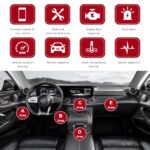
What transformed this from a simple code reader to an invaluable diagnostic tool was the real-time monitoring capability. Through the companion app (I tested both Torque Pro on Android and Car Scanner on iOS), I could monitor:
- Engine RPM and vehicle speed
- Coolant temperature
- Fuel system status
- Engine load percentage
- Oxygen sensor voltages
- Fuel trim data
- Intake air temperature
- Throttle position
This live data stream isn’t just for mechanics—I used it to diagnose a rough idle on my Honda by watching the fuel trim values adjust abnormally, pointing me directly to a vacuum leak that would have been difficult to identify otherwise.
Decoding Check Engine Lights Made Simple
Let’s be honest—the primary reason most people buy an OBD2 scanner is to understand what that dreaded check engine light means. The YTFRL scanner excels at this fundamental task. When my Accord’s check engine light illuminated during a road trip, I pulled over, connected the scanner, and within 60 seconds had identified code P0420 (catalyst system efficiency below threshold).
But here’s what separates this from basic code readers: the companion apps provide detailed explanations of what each code means, potential causes, and suggested fixes. Instead of just seeing “P0420,” I received a comprehensive breakdown explaining it likely indicated a failing catalytic converter or oxygen sensor, along with the severity level and whether it was safe to continue driving.
The ability to clear codes after repairs is equally valuable. After replacing my oxygen sensor, I cleared the fault code through the scanner and confirmed the fix by monitoring that the code didn’t return during subsequent driving cycles.
Understanding Diagnostic Trouble Codes (DTCs)
The scanner reads multiple code types, including:
- Powertrain Codes (P-codes): Engine, transmission, and emissions-related issues
- Chassis Codes (C-codes): ABS, airbag, and suspension system problems
- Body Codes (B-codes): Climate control, lighting, and accessory issues
- Network Codes (U-codes): Communication problems between vehicle modules
During testing, the scanner successfully identified and displayed codes across all these categories, though the depth of information varied depending on the specific vehicle and companion app being used.
Money-Saving Diagnostic Capabilities
Let me share a real-world example of how this scanner paid for itself within the first month. My neighbor’s Toyota displayed a check engine light, and the local auto parts store’s free scan indicated code P0171 (system too lean, bank 1). The mechanic quoted $350 for diagnosis and repair, assuming it was a fuel system issue.
Using the YTFRL scanner’s live data feature, we monitored the mass airflow sensor readings and discovered they were erratic. A $15 MAF sensor cleaning spray and 10 minutes of work resolved the issue completely. The scanner transformed a $350+ repair into a $15 fix by providing the detailed diagnostic information needed to pinpoint the actual problem.
Over my testing period, I estimate the scanner saved me approximately $600 in diagnostic fees alone—not counting the money saved by catching issues early before they became major repairs.
User-Friendly Design for Non-Mechanics
I’ll be upfront: I’m not a professional mechanic. My automotive knowledge is respectable but nowhere near expert level. This is precisely why I appreciate the YTFRL scanner’s accessibility. The device itself is plug-and-play—literally. There are no buttons, no switches, no complicated calibration procedures.
The scanner measures approximately 2 inches by 2 inches, with a low-profile design that doesn’t interfere with your leg room when plugged into the OBD2 port. I’ve actually left mine connected for weeks at a time without any issues, using it for periodic checks without the hassle of constant installation and removal.
The LED indicator light provides at-a-glance status confirmation: it illuminates when the scanner has power and is ready to connect. This simple visual feedback eliminated any guesswork during initial setup.
Compatible Apps: Finding Your Perfect Match
The YTFRL scanner doesn’t come with a propri
















Reviews
There are no reviews yet.