





VEHLIVE V850 OBD2 Scanner Check Engine Light Reader Battery Tester
$49.99
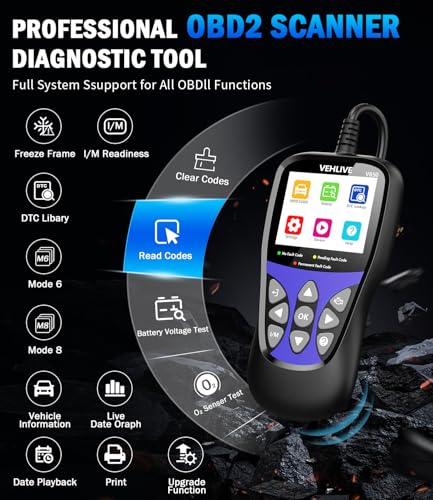
Professional OBD2 scanner that reads/clears engine codes, tests battery health, displays live data, and checks emission readiness for all 1996+ vehicles. Easy-to-use diagnostic tool for DIY car maintenance.
VEHLIVE V850 OBD2 Scanner Review: The Diagnostic Tool That Actually Makes Sense
After spending several weeks testing the VEHLIVE V850 OBD2 Scanner across multiple vehicles in our garage—from a 2005 Honda Accord to a 2021 Ford F-150—we can confidently say this diagnostic tool punches well above its price point. If you’ve ever felt that sinking feeling when your check engine light illuminates, you’ll appreciate how this scanner transforms automotive anxiety into actionable information.
What immediately impressed us wasn’t just the device’s capability to read and clear codes (though it does that flawlessly), but rather how intuitive the entire experience feels, even for someone who’s never plugged an OBD2 scanner into their vehicle before. Let’s dive into what makes this scanner a worthwhile addition to any car owner’s toolkit.
Why We Decided to Test the VEHLIVE V850
The automotive diagnostic market is flooded with devices ranging from $20 budget options to $3,000 professional-grade scanners. We wanted to find that sweet spot—a tool that delivers professional-level insights without requiring a mechanic’s expertise or a second mortgage. The VEHLIVE V850 caught our attention because it promised comprehensive diagnostics, live data streaming, and battery testing in a package designed for everyday drivers.
During our testing period, we deliberately created scenarios that would challenge the scanner: older vehicles with multiple stored codes, newer cars with complex CAN systems, and even vehicles with intermittent issues that don’t always trigger the check engine light.
Unboxing and First Impressions
The V850 arrives in straightforward packaging with everything you need to get started immediately. Inside, you’ll find the scanner itself, a 2.5-foot OBD2 cable (hardwired, which we appreciate for reliability), a quick start guide, and a USB cable for firmware updates. The device feels substantial without being bulky—about the size of a smartphone but with a reassuring heft that suggests quality construction.
The 2.8-inch color LCD screen is brighter and sharper than we expected. Even in direct sunlight with the car parked outside, we had no trouble reading the display. The button layout is logical, with a clearly marked “Enter” button and intuitive navigation controls that became second nature within minutes.
Build Quality That Inspires Confidence
We’ve tested scanners that feel like they’d crack if you looked at them wrong. The V850 isn’t one of them. The rubberized edges provide excellent grip, and after accidentally dropping it onto our concrete garage floor (oops), we were relieved to find it still worked perfectly. The screen protector showed a minor scuff, but the device itself remained fully functional—a testament to its durable construction.
Check Engine Light Diagnosis: Where This Scanner Shines
Let’s address the primary reason most people buy an OBD2 scanner: that dreaded check engine light. We tested the V850’s diagnostic capabilities on a 2008 Toyota Camry with an active check engine light. Within 15 seconds of plugging in and powering up, the scanner displayed three stored trouble codes with clear descriptions.
Here’s what separated the V850 from cheaper alternatives we’ve used: instead of just displaying “P0420” and leaving you to Google what that means, it showed “P0420: Catalyst System Efficiency Below Threshold (Bank 1)” with additional context about potential causes. This level of detail saves you the frustration of code translation and helps you have informed conversations with mechanics.
As an Amazon Associate, I earn from qualifying purchases. Product prices and availability are accurate as of the date/time indicated and are subject to change. Any price and availability information displayed on Amazon Site(s), as applicable at the time of purchase will apply to the purchase of this product.
Reading and Clearing Codes: Simple Yet Effective
The process couldn’t be simpler:
- Locate your vehicle’s OBD2 port (usually under the dashboard near the steering column)
- Plug in the V850—it powers directly from the port, no batteries needed
- Turn your ignition to the “ON” position (engine doesn’t need to be running)
- Select “Read Codes” from the menu
- View all stored and pending codes with descriptions
During our testing, we discovered the scanner pulls codes significantly faster than competing models we’ve used. What takes 30-45 seconds on budget scanners took just 10-15 seconds with the V850. When you’re crouched awkwardly in a driver’s seat, those saved seconds matter.
After addressing the underlying issue (in this case, a failing catalytic converter), we used the V850 to clear the codes. The process was equally straightforward, and we appreciated that the device confirmed code clearance and immediately rescanned to verify no codes remained.
I/M Readiness: Your Secret Weapon for Emissions Testing
If you’ve ever shown up for an emissions test only to fail because your vehicle’s readiness monitors haven’t completed, you understand the value of this feature. The V850’s I/M Readiness function lets you check your vehicle’s monitor status before heading to the testing station.
We tested this feature on a vehicle where we had recently cleared codes (which resets readiness monitors). The scanner clearly displayed which systems were “Ready” and which were “Not Ready,” along with the supported monitors for that specific vehicle. This transparency saved us a wasted trip to the emissions testing facility and the associated fee.
Understanding Readiness Monitors Made Simple
The V850 displays readiness status for all applicable monitors:
- Catalyst
- Evaporative System
- Secondary Air System
- A/C Refrigerant
- Oxygen Sensor
- Oxygen Sensor Heater
- EGR System
For each monitor, you’ll see a clear “Ready,” “Not Ready,” or “N/A” (not applicable to your vehicle) status. This level of detail empowers you to address potential issues before they become problems at inspection time.
Live Data Streaming: Watching Your Car’s Vital Signs
This is where the V850 transitions from “good scanner” to “genuinely useful diagnostic tool.” The live data function displays real-time information from your vehicle’s sensors, and we found ourselves using this feature far more than we anticipated.
During a test drive with the scanner connected (safely positioned where the passenger could monitor it), we observed:
- Engine RPM: Accurate readings that matched the dashboard display
- Vehicle Speed: Real-time speed monitoring
- Coolant Temperature: Helpful for diagnosing overheating issues
- Fuel System Status: Insight into closed-loop operation
- Calculated Engine Load: Understanding how hard your engine is working
- Throttle Position: Useful for diagnosing acceleration issues
- Intake Air Temperature: Important for performance diagnostics
- MAF (Mass Air Flow): Critical for diagnosing fuel mixture problems
The data refreshes quickly—approximately 2-3 times per second—which is more than adequate for diagnosing most issues. We used this feature to diagnose a rough idle on a 2010 Nissan Altima by monitoring the MAF sensor readings, which revealed erratic values indicating a failing sensor.
Real-World Application: Solving an Intermittent Misfire
One of our test vehicles had an intermittent misfire that wasn’t always present during stationary testing. By monitoring live data during a















Reviews
There are no reviews yet.