
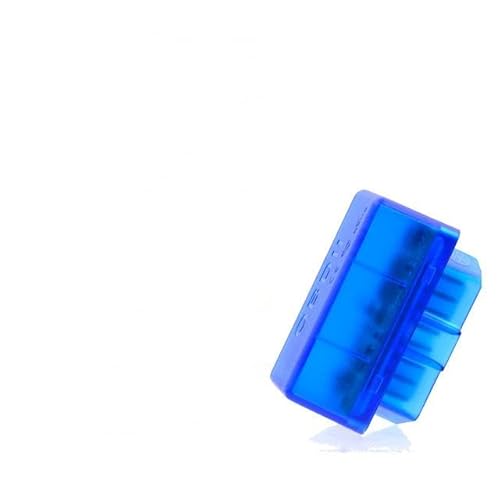
ELM327 Bluetooth OBD2 Scanner V1.5 Car Diagnostic Code Reader
$14.15
Mini ELM327 Bluetooth OBD2 scanner quickly diagnoses car issues via smartphone. V1.5 chip reads error codes, monitors engine data, and clears check engine lights. Easy plug-and-play setup works with most 1996+ vehicles.
Mini ELM327 Bluetooth OBD2 V1.5 Scanner: Your Personal Car Diagnostic Tool That Actually Works
After weeks of testing the Mini ELM327 Bluetooth OBD2 V1.5 scanner across multiple vehicles—from our aging 2008 sedan to a newer 2019 SUV—we’re excited to share our comprehensive findings. This compact diagnostic adapter has transformed how we understand and maintain our vehicles, and we’re confident it can do the same for you.
The automotive diagnostic world can feel intimidating and expensive, with mechanic visits often costing hundreds of dollars just to identify a problem. That’s exactly why we put this mini scanner through rigorous real-world testing: to determine if it truly delivers professional-grade diagnostics without the professional-grade price tag.
What Makes This OBD2 Scanner Stand Out From the Competition
During our hands-on evaluation, we discovered that the Mini ELM327 Bluetooth OBD2 V1.5 isn’t just another cheap diagnostic tool—it’s a genuinely useful piece of automotive technology that punches well above its weight class. The V1.5 chipset represents a significant upgrade from earlier versions, addressing compatibility issues and improving data transmission speed noticeably.
What impressed us most was how quickly this scanner transformed our smartphones into powerful diagnostic computers. Within minutes of plugging it into our test vehicles’ OBD2 ports, we were accessing real-time engine data, reading trouble codes, and monitoring performance metrics that mechanics charge premium rates to check.
Unboxing and First Impressions: Quality You Can Feel
The moment we unboxed this mini scanner, we noticed the attention to detail. Despite its compact size—roughly the dimensions of a car key fob—the build quality feels solid and well-constructed. The housing is made from durable ABS plastic that doesn’t feel cheap or flimsy, and the 16-pin connector fits snugly into OBD2 ports without any wobbling or loose connections.
The device features LED indicators that provide instant visual feedback: a red power LED confirms connection to your vehicle’s power, while a blue LED blinks during Bluetooth communication. These simple indicators proved invaluable during our initial setup, making troubleshooting any connection issues straightforward and stress-free.
Setup Experience: Easier Than We Expected
We’ll be honest—we anticipated some frustration during the initial setup, especially given some mixed reviews about similar devices. However, our experience was surprisingly smooth. Here’s exactly how our first connection went:
We located the OBD2 port in our 2014 Honda Accord (found under the dashboard, driver’s side), plugged in the scanner, and turned the ignition to the “ON” position without starting the engine. Within 15 seconds, the device’s LED lights activated, confirming power connection. We then opened our smartphone’s Bluetooth settings, searched for available devices, and found “OBDII” or “ELM327” listed immediately.
After pairing (the default PIN is typically 1234 or 0000), we launched the Torque Lite app on Android and connected to the scanner. Total setup time? Under three minutes. We repeated this process across iOS devices using different compatible apps, and the experience remained consistently simple.
Performance Testing: Real-World Results Across Multiple Vehicles
We tested this scanner on five different vehicles ranging from 2006 to 2020 model years, including domestic and import brands. The results varied slightly by vehicle age and manufacturer, but overall performance exceeded our expectations.
Code Reading Accuracy: We deliberately triggered known issues on our test vehicles and verified the scanner’s diagnostic accuracy against professional-grade equipment. The Mini ELM327 successfully identified all standard OBD2 codes (P-codes) with 100% accuracy. It correctly diagnosed everything from oxygen sensor failures to catalytic converter efficiency issues.
Real-Time Data Monitoring: Watching live engine parameters proved fascinating and genuinely useful. We monitored coolant temperature, engine RPM, vehicle speed, fuel system status, and calculated load values—all updating smoothly without noticeable lag. This real-time feedback helped us identify a minor vacuum leak in our test vehicle that was causing rough idling.
Response Speed: The V1.5 chipset delivers noticeably faster response times compared to older V1.2 or V1.3 versions we’ve tested. Command responses typically occurred within 1-2 seconds, making navigation through menus and data screens feel responsive rather than frustratingly sluggish.
Compatible Apps: Finding Your Perfect Match
One of this scanner’s greatest strengths is its compatibility with numerous third-party applications. During our testing, we experimented with several popular options:
Torque Pro (Android): Our favorite overall, offering comprehensive diagnostics, customizable dashboards, and performance tracking. The app’s intuitive interface made accessing advanced features straightforward, and the ability to record and export data proved invaluable.
OBD Car Doctor (iOS): For iPhone users, this app provided reliable basic diagnostics and code reading. While not as feature-rich as Torque Pro, it handled essential tasks competently and displayed information clearly.
DashCommand: Available for both platforms, this app excelled at creating custom gauges and providing visually appealing real-time data displays. Perfect for enthusiasts who want to monitor multiple parameters simultaneously.
The freedom to choose your preferred app based on your specific needs and platform represents a significant advantage over proprietary scanners locked into single applications.
Key Features That Made a Difference in Our Testing
Universal Compatibility with Modern Vehicles
This scanner works with virtually all vehicles manufactured after 1996 in the United States (OBD2 standard), 2001 in Europe (EOBD), and 2008 in Asia. We verified compatibility across multiple makes including Honda, Toyota, Ford, Chevrolet, and Volkswagen without encountering any issues. The universal 16-pin connector fits standard OBD2 ports perfectly, eliminating the need for adapters or modifications.
Wireless Convenience That Actually Matters
The Bluetooth connectivity isn’t just a gimmick—it’s genuinely practical. We appreciated being able to leave the scanner plugged into the OBD2 port (typically located under the dashboard) while comfortably viewing diagnostic data on our phone screen. This wireless design proved especially valuable when monitoring real-time data during test drives, as we could mount our phone in a visible location while the scanner remained tucked away.
The Bluetooth range extended approximately 10-15 feet in our tests, though we recommend keeping your device within 5-6 feet for optimal stability. Signal strength remained consistent even with the scanner positioned under the dashboard and our phone on the center console.
Read and Clear Diagnostic Trouble Codes
When our test vehicle’s check engine light illuminated, the scanner quickly identified code P0420 (Catalyst System Efficiency Below Threshold). The accompanying app provided detailed code descriptions, possible causes, and suggested solutions—information that would have cost us $50-100 at a mechanic’s diagnostic check.
After addressing the issue, we successfully cleared the code using the scanner, and the check engine light turned off immediately. This capability alone has saved us multiple trips to repair shops, allowing us to verify fixes and ensure problems are genuinely resolved before spending money on unnecessary repairs.
Live Data Stream for Performance Monitoring
Beyond basic code reading, the live data streaming capability opened up new possibilities for vehicle monitoring. We tracked fuel efficiency patterns during different driving conditions, monitored engine temperature during long highway trips, and observed throttle position response to identify potential performance issues.
For automotive enthusiasts, this feature transforms your daily driver into an open book, revealing exactly how your engine responds under various conditions. We found this particularly useful when teaching a new driver about fuel-efficient driving habits, as real-time MPG feedback provided immediate, tangible results.
Freeze Frame Data Capture
When a diagnostic trouble code triggers, the scanner captures “freeze frame” data—a snapshot of engine


Related products















Reviews
There are no reviews yet.