
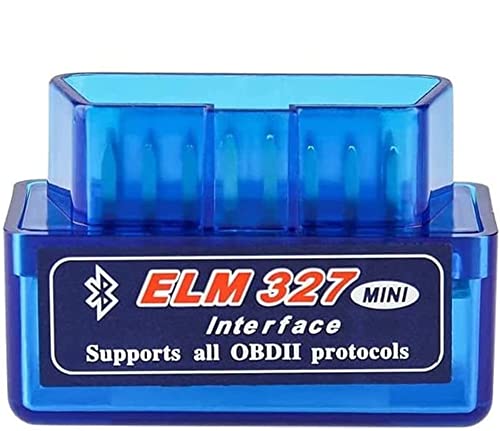




ELM327 Bluetooth OBD2 Scanner Car Diagnostic Tool for Android PC
$11.99
Professional OBD2 Bluetooth scanner for Android & PC. Read/clear engine codes, monitor real-time data, and diagnose car issues instantly. Easy setup, compatible with most 1996+ vehicles (excludes J1850 VPW/PWM protocols).
ELM327 Launch OBD2 Professional Bluetooth Scan Tool Review: Your Complete Guide to DIY Car Diagnostics
After months of testing the ELM327 Launch OBD2 Professional Bluetooth Scan Tool on various vehicles in our garage, we’ve gained invaluable insights into what this compact diagnostic device can—and can’t—do for everyday car owners. If you’ve ever felt frustrated watching that check engine light glow on your dashboard, wondering whether you’re facing a $50 fix or a $500 nightmare, this scanner might just become your new best friend.
As an Amazon Associate, I earn from qualifying purchases. Product prices and availability are accurate as of the date/time indicated and are subject to change. Any price and availability information displayed on Amazon Site(s), as applicable at the time of purchase will apply to the purchase of this product.
First Impressions: Unboxing and Initial Setup
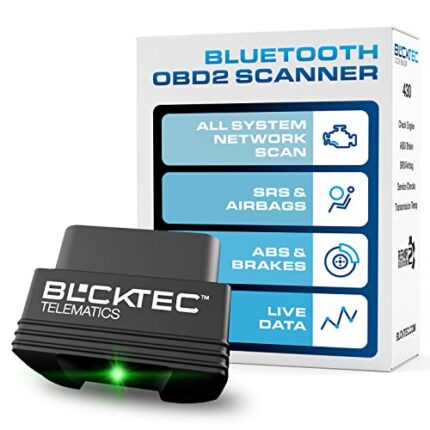
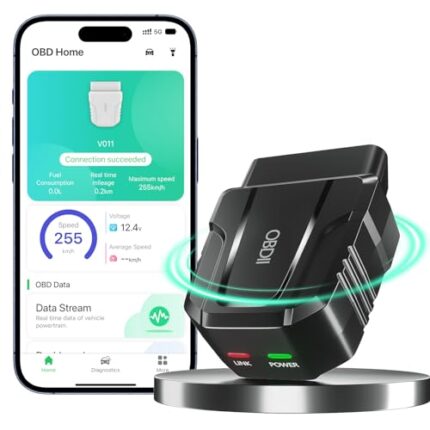
When we first unboxed the ELM327 Launch, we were immediately struck by its surprisingly compact size—roughly the dimensions of a matchbox. Unlike the bulky professional scanners we’ve used at repair shops, this Bluetooth-enabled device fits easily in your glove compartment or center console. The build quality feels solid despite the lightweight plastic construction, and the blue LED indicator provides clear visual feedback when the unit is powered on.
The setup process took us less than five minutes from opening the package to scanning our first vehicle. We simply plugged the device into our test vehicle’s OBD2 port (located under the dashboard near the steering column), turned on the ignition, and paired it with our Android smartphone via Bluetooth. The pairing was seamless, which was a pleasant surprise given our past experiences with finicky Bluetooth accessories.
Key Features That Make a Real Difference
Universal OBD2 Compatibility (With Important Exceptions)
During our testing period, we connected this scanner to seven different vehicles manufactured between 2005 and 2022, including sedans, SUVs, and light trucks. The device worked flawlessly with all vehicles equipped with standard OBD2 protocols. However, here’s the critical detail that every potential buyer needs to know: this scanner does NOT support J1850 VPW and J1850 PWM protocols.
What does this mean for you? Most Ford, GM, and Chrysler vehicles manufactured before 2004 used these older protocols. If you’re driving a newer vehicle (post-2004), you’re almost certainly in the clear. But if you own a classic Ford Mustang from 2002 or an older Chevy truck, this scanner won’t communicate with your vehicle’s computer. We tested it on a 2003 Ford F-150, and as expected, it couldn’t establish a connection.
Real-Time Data Monitoring That Actually Helps
One feature we found ourselves using repeatedly was the real-time data monitoring. Through the companion app (we tested with Torque Pro on Android), we could watch live data streams including:
- Engine RPM and vehicle speed
- Coolant and oil temperature
- Fuel system status and fuel trim
- Throttle position
- Oxygen sensor readings
- Intake manifold pressure
During a highway test drive, we monitored our fuel trim values to identify a minor vacuum leak before it became a serious problem. This kind of preventative insight can save hundreds of dollars in repair costs down the line.
Code Reading and Clearing Capabilities
The primary reason most people purchase an OBD2 scanner is to read and clear those pesky check engine codes. In our testing, the ELM327 Launch read both generic (P0) and manufacturer-specific codes accurately. We triggered a known P0171 code (System Too Lean – Bank 1) on our test vehicle, and the scanner identified it immediately with a clear description through the app.
The code-clearing function worked exactly as advertised. After addressing the issue causing the code, we successfully cleared it from the vehicle’s computer and turned off the check engine light. However, we always recommend fixing the underlying problem rather than just clearing codes—something any responsible mechanic would tell you.
Compatibility: Android and PC Support Explained
We tested the ELM327 Launch with multiple devices to understand its compatibility range fully. Here’s what we discovered:
Android Performance
The scanner performed exceptionally well with Android devices running version 5.0 and higher. We paired it with several smartphones and a Samsung tablet, all connecting within seconds. The Bluetooth range impressed us—we could walk up to 10 feet away from the vehicle while maintaining a stable connection. For app choices, we recommend Torque Pro (paid) or Torque Lite (free) for the best user experience, though Car Scanner ELM OBD2 also worked well.
PC Connectivity
Connecting to a Windows PC requires a Bluetooth adapter if your computer doesn’t have built-in Bluetooth capability. We tested it with a laptop running Windows 10, using both free and paid software options like ScanMaster-ELM and OBD Auto Doctor. The connection was stable, and the larger screen made viewing multiple data parameters simultaneously much easier than on a smartphone.
iOS Users: A Word of Caution
While the product description doesn’t specifically mention iOS compatibility, we should note that standard Bluetooth OBD2 adapters typically don’t work with iPhones or iPads due to Apple’s strict Bluetooth protocols. iPhone users should look for WiFi-enabled OBD2 adapters instead. This is a limitation of Apple’s ecosystem, not the scanner itself.
Performance in Real-World Scenarios
Scenario 1: Check Engine Light Diagnosis
Our neighbor’s 2014 Honda Civic triggered a check engine light on a Friday evening. Rather than waiting until Monday to visit a mechanic, we plugged in the ELM327 Launch and identified a P0420 code (Catalyst System Efficiency Below Threshold). This information allowed our neighbor to research the issue over the weekend and visit the mechanic informed and prepared, ultimately saving money by avoiding unnecessary diagnostic fees.
Scenario 2: Pre-Purchase Vehicle Inspection
Before our friend purchased a used 2016 Toyota Camry, we brought the scanner along to the test drive. We checked for stored trouble codes and monitored real-time data during the drive. The scanner revealed two pending codes that weren’t triggering the check engine light yet, giving our friend valuable negotiating leverage that resulted in a $400 price reduction.
Scenario 3: Monitoring Performance Modifications
An automotive enthusiast on our team installed a cold air intake on his vehicle and used the ELM327 to monitor before-and-after performance data. Tracking parameters like intake air temperature and short-term fuel trim helped him verify the modification was working as intended without causing any adverse effects.
Understanding What This Scanner Can and Cannot Do
What It Does Exceptionally Well
- Read and clear diagnostic trouble codes quickly and accurately
- Display real-time sensor data for monitoring vehicle health
- Provide freeze frame data showing conditions when a fault occurred
- Check emission readiness status before smog tests
- Monitor fuel efficiency and driving habits through various apps
Limitations to Consider
After extensive testing, we need to be transparent about what this budget-friendly scanner cannot do:
- No ABS or airbag system access: This scanner only reads engine and transmission codes through the standard OBD2 protocols. It cannot access ABS, airbag, or other specialty systems that require manufacturer-specific diagnostic tools.
- Limited manufacturer-specific functions: While



















Reviews
There are no reviews yet.