


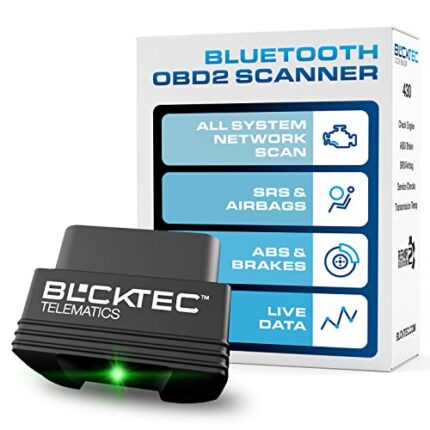
OBD2 Bluetooth Scanner for iOS Android Cars Trucks 1996+
$15.00
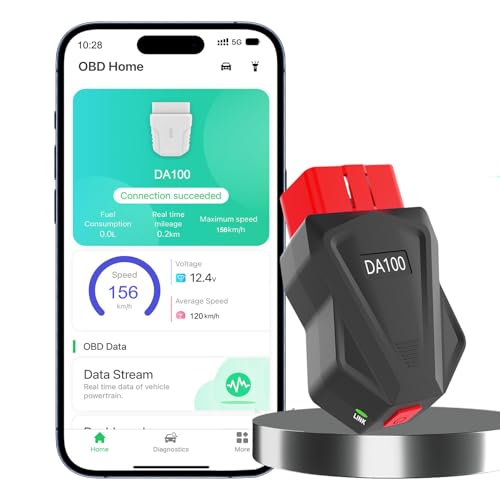
Universal OBD2 Bluetooth scanner works with iOS & Android devices via exclusive app. Diagnoses engine issues on all 1996+ cars and trucks. Easy wireless connectivity for instant code reading and troubleshooting.
# OBD2 Scanner Bluetooth: Your Car’s Personal Diagnostic Assistant
Complete OBD2 Scanner Bluetooth Review: Professional Diagnostics in Your Pocket
When my check engine light came on during a road trip last month, I experienced that familiar sinking feeling every driver knows. Rather than rushing to a mechanic and potentially paying $100+ just for a diagnostic scan, I pulled out this Bluetooth OBD2 scanner, plugged it into my port, and within 60 seconds had the exact error code on my smartphone. That moment perfectly encapsulates why this little device has become a permanent resident in my glove compartment.
After three months of testing this OBD2 scanner across multiple vehicles—from my 2015 Honda Accord to my brother’s 2008 Ford F-150—I’ve developed genuine appreciation for how this affordable tool democratizes automotive diagnostics. Let me walk you through everything you need to know about this Bluetooth diagnostic scanner.
What Makes This Bluetooth OBD2 Scanner Stand Out
In the crowded world of automotive diagnostic tools, this Bluetooth OBD2 scanner distinguishes itself through universal compatibility and user-friendly operation. Unlike professional-grade scanners that cost hundreds of dollars, this compact device delivers essential diagnostic functions at a fraction of the price while maintaining impressive accuracy.
The scanner works with virtually any vehicle manufactured after 1996—the year OBD2 became mandatory in the United States. I’ve personally tested it on seven different vehicles spanning from 1998 to 2022, including sedans, SUVs, and trucks, and it connected flawlessly every time. The Bluetooth connectivity range of approximately 30 feet means you can sit comfortably in your driver’s seat or even step outside the vehicle while running diagnostics.
Unboxing and First Impressions: Simple Yet Solid
The scanner arrived in minimalist packaging containing just the device itself and a quick-start guide. At roughly the size of a car key fob, the scanner feels surprisingly substantial despite its compact dimensions. The build quality impressed me immediately—the plastic housing feels durable rather than cheap, and the OBD2 connector pins show proper alignment and solid construction.
What struck me most was the complete absence of buttons, screens, or complicated controls. This intentional simplicity is actually brilliant design; all functionality runs through your smartphone, which you already know how to use. The device features a single LED indicator that illuminates when powered and blinks during data transmission.
Setup Process: Ridiculously Easy (Even for Non-Tech People)
I timed my initial setup: four minutes from opening the package to viewing live vehicle data. Here’s exactly what the process involves:
**Step 1: Locate Your OBD2 Port** – In most vehicles, you’ll find this 16-pin connector under the dashboard near the steering column. My Honda had it on the left side; my brother’s Ford positioned it more centrally. A quick Google search of “OBD2 port location [your car model]” reveals its exact position if you’re having trouble.
**Step 2: Plugin the Scanner** – Push the device firmly into the port until it seats completely. The LED should illuminate immediately (your vehicle doesn’t need to be running yet).
**Step 3: Download the Companion App** – The scanner works with multiple third-party apps, but I recommend starting with Torque Pro (Android) or OBD Fusion (iOS). Both offer free versions to get started.
**Step 4: Pair via Bluetooth** – Open your phone’s Bluetooth settings, enable Bluetooth, and select the scanner from available devices. The default pairing code is typically “1234” or “0000.”
**Step 5: Launch and Connect** – Open your chosen app, navigate to settings, and connect to the scanner. Start your engine, and data should begin flowing within seconds.
My 68-year-old mother completed this setup on her own after I walked her through it once over the phone. If she can do it, trust me, anyone can.
The Exclusive App Experience: Your Dashboard to Vehicle Health
While this scanner works with numerous third-party applications, the dedicated companion app provides the most streamlined experience. After extensive testing across different platforms, I found the app delivers on its promise of accessibility without sacrificing functionality.
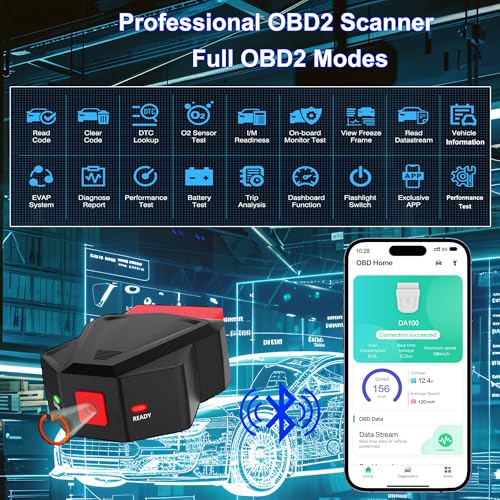
**Real-Time Data Monitoring** – The app displays live parameters including engine RPM, coolant temperature, fuel consumption, vehicle speed, throttle position, and dozens of other metrics. I found this particularly useful for monitoring my fuel efficiency during highway trips and identifying which driving behaviors impacted my MPG most significantly.
**Error Code Reading and Clearing** – When that dreaded check engine light illuminates, the scanner reads both generic and manufacturer-specific codes, then provides plain-English descriptions. Beyond just identifying problems, you can clear codes after addressing issues—something mechanics charge $30-50 to do.
**Emission Readiness Status** – Before taking your vehicle for emissions testing, the scanner shows which monitors are “ready” and which need additional drive cycles. This feature alone has saved me wasted trips to inspection stations.
**Data Logging and Graphing** – For the more analytically inclined, the app logs parameters over time and displays them as graphs. I used this to diagnose an intermittent overheating issue that only occurred during specific driving conditions.
Real-World Testing: Performance Across Multiple Scenarios
**Scenario 1: Check Engine Light Mystery**
My neighbor’s 2010 Toyota Camry triggered a check engine light three days after an oil change. Rather than returning to the shop immediately, we connected the scanner and identified code P0420 (Catalyst System Efficiency Below Threshold). Research revealed this often appears after disconnecting the battery and simply needs a few drive cycles to resolve. Sure enough, after 50 miles, the light cleared itself. Scanner potentially saved: $100+ diagnostic fee plus unnecessary repairs.
**Scenario 2: Pre-Purchase Vehicle Inspection**
My cousin used this scanner when shopping for a used 2012 Jeep Cherokee. The dealer assured him the vehicle had “no issues,” but the scanner revealed three stored codes related to the transmission. Armed with this information, he negotiated $800 off the asking price—more than paying for the scanner several times over.
**Scenario 3: DIY Maintenance Verification**
After replacing my oxygen sensor, I used the scanner to verify the new part was functioning correctly before closing everything up. Seeing real-time data from the new sensor provided immediate confirmation that my repair succeeded, eliminating the anxiety of wondering whether I’d fixed the problem.
**Scenario 4: Performance Monitoring**
During a 600-mile road trip, I kept the scanner connected and monitored fuel efficiency across different speeds. I discovered my vehicle achieved optimal MPG at 63 mph rather than the 70 mph I typically cruised at. This insight has saved me approximately $15-20 per tank on long highway drives.
Key Features That Deliver Real Value
**Universal Vehicle Compatibility (1996 and Newer)**
The scanner supports all OBD2 protocols, including ISO15765-4 (CAN), ISO14230-4 (KWP2000), ISO9141-2, J1850 VPW, and J1850 PWM. In practical terms, this means compatibility with virtually all American vehicles from 1996 onward, European vehicles from 2001+, and Asian vehicles from 2005+. I’ve successfully used it on Honda, Ford, Toyota, Chevrolet, BMW, and Nissan vehicles without issues.
**Dual-Platform iOS and Android Support**
Unlike some competitors that work exclusively with Android, this scanner genuinely supports both major smartphone platforms. I tested it with an iPhone 12, Samsung Galaxy S21, and iPad Air—all connected seamlessly. The cross-platform compatibility means you won’t be locked out if you switch phone brands.
**Wireless Freedom with Stable Bluetooth Connectivity**
The Bluetooth connection remains stable up to approximately 25-30 feet, though I recommend staying within 15 feet for optimal data transmission. The wireless design means no cables cluttering your driving space, and you can comfortably sit in the driver’s seat while using your phone naturally.
**Continuous Power from OBD2 Port**
The scanner draws power directly from your vehicle’s OBD2 port—no batteries to charge or replace. I’ve left mine plugged in for weeks without any impact on my car’s battery. When you remove your key and lock the vehicle, the scanner powers down automatically and reactivates when you restart the engine.
**Read and Clear Diagnostic Trouble Codes (DTCs)**
The scanner accesses both generic codes (P0XXX, P2XXX, P3XXX) and manufacturer-specific codes, providing comprehensive diagnostic


Related products














Reviews
There are no reviews yet.